Microsoft has released a redesigned context menu for File Explorer to Windows 11 Beta channel participants. The update is included in build 26220.9757, following initial testing in the Experimental channel that began in August.
The company developed the new interface to address performance issues and clutter in the existing menu, which often slowed down due to numerous third-party app integrations. The redesign focuses on streamlining the top-level view to include only frequently used actions.
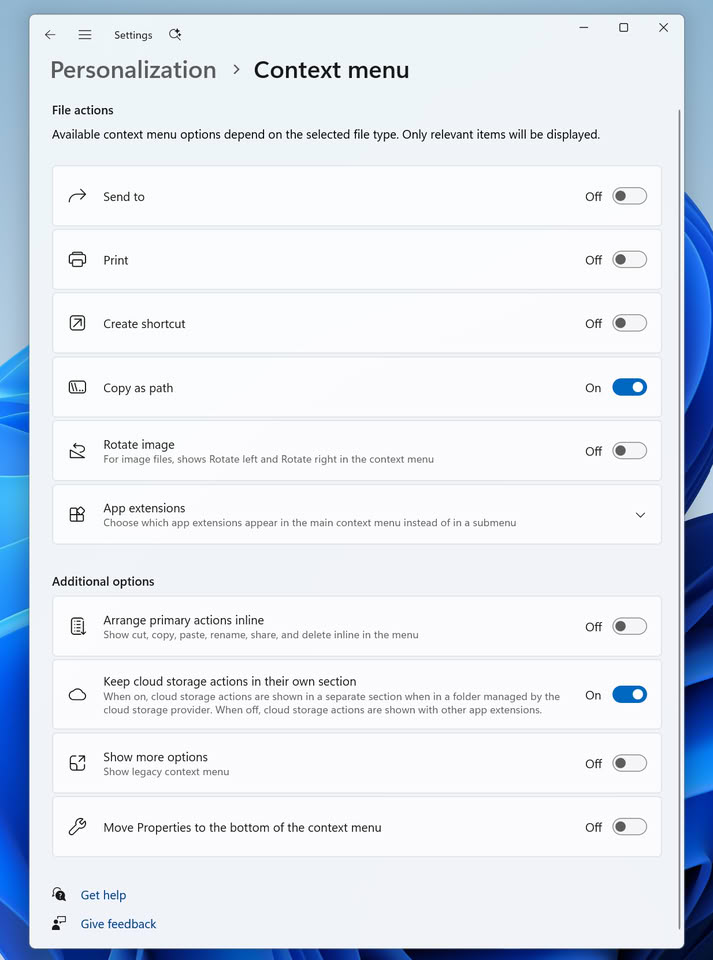
Users can now access a dedicated settings page via a Customize menu link. This allows for toggling built-in commands like Send to and Create shortcut, as well as managing app extensions. Options can be hidden or moved to submenus to reduce visual noise.
The update also introduces display preferences for core functions. Actions such as Cut, Copy, Paste, Rename, Delete, and Share can now be presented as text labels rather than icons. Properties can be repositioned to the bottom of the list.
Microsoft plans to continue refining the menu layout based on user feedback from the Insider program. To assist with the transition, the system may display a teaching tip to highlight the new customization features for first-time users.