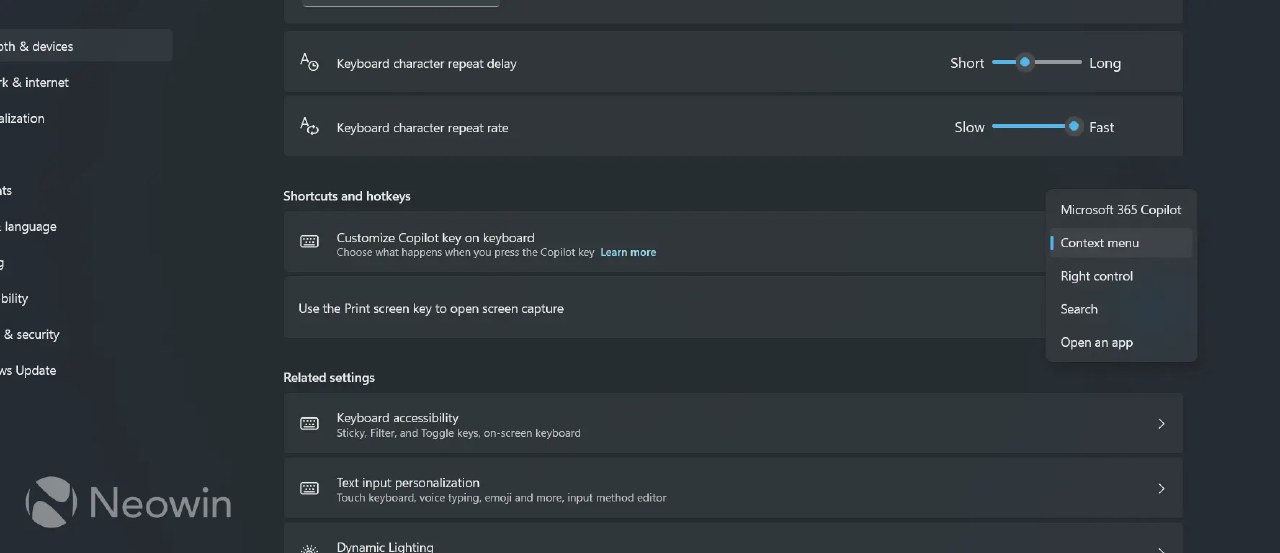
Microsoft is introducing a native key remapping option for Windows 11, allowing users to repurpose the dedicated physical Copilot key. The new setting, currently available in the Release Preview channel, lets users assign the key to the right Ctrl function or the Context Menu.
The physical Copilot key was previously mandated by Microsoft for all new PC hardware, often replacing the right Ctrl or Menu keys. This design change caused significant disruption for power users, developers, and those relying on accessibility tools, as it interfered with established keyboard shortcuts and workflows.
Users can now configure the key via the Bluetooth & Devices settings menu. Microsoft notes that when the key is remapped to the right Ctrl, some three-key combinations involving the Windows or Shift keys may not function as expected, and the company recommends using the left Ctrl for such tasks.
The update also advises users to avoid conflicts if their OEM hardware already provides proprietary software for key remapping. While the physical Copilot branding on the keys remains, the software change allows users to restore traditional functionality to their keyboards.
The feature is currently undergoing final testing in the 24H2 branch of Windows 11. Microsoft plans to roll out this update to all users as part of the official cumulative update scheduled for release in October.