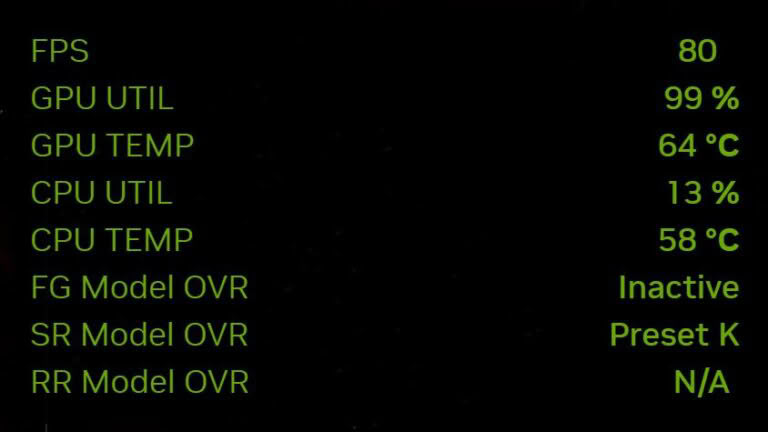
NVIDIA has released version 11.0.9 of the NVIDIA App, which introduces new CPU monitoring capabilities to its built-in in-game overlay. Users can now track processor temperature, power consumption, and clock speed directly while gaming, eliminating the need for third-party tools like HWiNFO or MSI Afterburner for these specific metrics.
The new features allow users to toggle the statistics overlay using the Alt+R shortcut or configure display settings via the Alt+Z menu. This update is particularly useful for laptop users, as it provides a clearer picture of how CPU and GPU performance, power, and thermal budgets interact within a shared cooling environment during gameplay.
Despite these additions, the NVIDIA App does not yet replace professional monitoring software. The overlay still lacks data on RAM and VRAM usage, and it does not provide per-core or per-thread load analysis. Advanced users focused on overclocking or deep system diagnostics will likely continue to rely on specialized third-party applications.
The update marks a shift for the NVIDIA App, as it evolves from a tool focused solely on GeForce GPU performance into a broader system monitoring utility. While it does not offer the granular detail of dedicated hardware tools, it simplifies the experience for users who only require basic real-time data on their processor's status.